
Google Business Profile: the practical guide to being found (and called)
The Google Business Profile (formerly Google My Business, a name many people still search for) is the most profitable marketing tool a local business owns: free, shown before your website, and wired to the gesture that matters, the phone call. Here is how to claim it, fill it in and keep it alive, setting by setting. This guide is part of our series Local visibility: the small business guide, from Google to Apple Maps. If you run an English-speaking business in France, everything here applies, and the profile is where your two audiences meet.
Why this profile outweighs your website
At one of our clients, an independent garage in Provence, the profile produced in six months 45 calls, 347 direction requests and 39 website visits, without advertising, a "call" being a tap on the profile's call button. In other words, nine actions out of ten happen directly on the profile, without touching the website. If you could only maintain one online tool, it would be this one.
Another lesson from the same client: calls almost quadrupled in six months, from about 4 a month to around fifteen. And since his website, live since late May, was linked to the profile, the profile's statistics have grown further: profile and website reinforce each other. Nothing magic, only a complete profile, real photos and accurate information, maintained over time.
Step 1: claim and verify the profile
Claiming the profile means proving to Google that this business is yours. Search your name on Google Maps: if a profile already exists, click "Claim this business"; otherwise create it at business.google.com. Google chooses the available verification methods for each business: phone or SMS, email, video, video call or sometimes a letter. Verification can be immediate, take several days or, for a letter, around two weeks.
As long as the profile is unclaimed, anyone can suggest edits to your hours or phone number. It is your shop window; take the keys back. And be reachable during verification: if Google refuses your proof or your video, we told a real case and the unblocking method in Verification rejected: what to do when everything failed.

Step 2: the settings that make the phone ring
The 8 settings, by order of impact
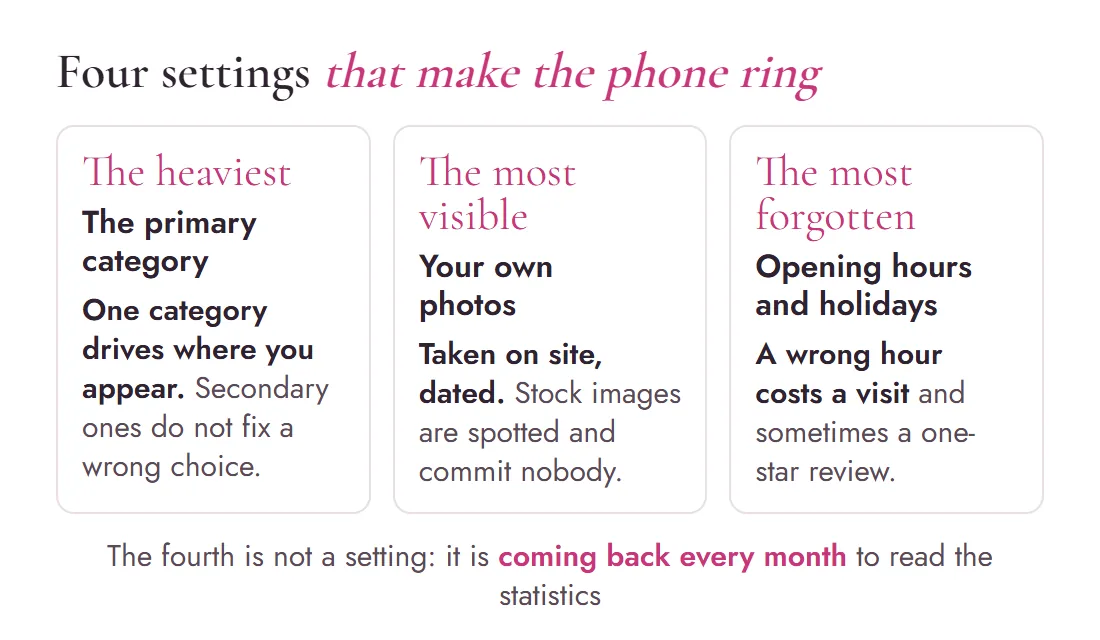
- The primary category. The most powerful setting. Pick the most precise one: "Auto repair shop" rather than "Repairs", "Bed & breakfast" rather than "Accommodation". Add secondary categories for your other activities.
- Phone and opening hours. Checked and current, public holidays included. A call landing on "number not in service" is a lost customer and a negative signal.
- The description. 750 characters to name your services, your area and what sets you apart. Write the way you talk to a customer, not like a brochure. If you serve international customers, say so and name your languages.
- Detailed services. List each service separately: Google matches these labels against searches ("air-con recharge", "bilingual website design").
- Real photos. Your storefront, your workshop, your work, you. No stock images: customers spot the authentic, and so does Google. One new photo a month is already a good minimum rhythm.
- The service area. Name the towns you genuinely serve, without stretching: an oversized area dilutes your local credibility.
- Attributes. Access, payment, appointments, languages spoken. Two minutes, and these details appear in search filters. "English spoken" is a filter your international customers actually use.
- Questions and answers. Ask yourself the 3 questions people ask you on the phone, and answer them. You save enquiry calls and occupy the space.
Step 3: maintain it, the real secret
A living profile beats a perfect one. A regularly updated profile inspires trust and avoids lost opportunities: outdated hours, old photos, unanswered reviews. An occasional photo, a useful update and a reply to every review show the business is genuinely active. Fifteen minutes a month is enough, but every month. Most of your competitors filled in their profile once, back in 2021, then nothing: that is your opening.
Reviews deserve their own method, from the direct link to answering negative ones: we detail it in Google reviews: how to get more, without buying or faking them.
Step 4: read the statistics once a month
In your profile, the "Performance" tab shows calls, direction requests, website clicks and the searches that surface you. Three concrete uses:
- Track the call trend: it is the number closest to your revenue.
- Spot the search terms that surface your profile: they reveal which services are already associated with your business, and which still need explaining.
- Prove the value of the work: these curves are your dashboard, more reliable than a general impression.
The mistakes that cost dearly
- The "enriched" name. Adding keywords to your official name ("Smith Garage · cheap · all brands") breaks Google's rules and can get the profile suspended.
- Inconsistent information. One phone number on the profile, another on the website: Google doubts, and so does the customer.
- Bought or traded reviews. Forbidden and detectable: Google can remove the reviews concerned, temporarily block new ones or display a public warning on the profile. The clean method is in our reviews guide.
- Abandonment. A profile without a recent photo or a recent review sends the same signal as a dusty shop window.
Your Google profile is your real homepage. The question is not whether it exists, but who controls it.
Frequently asked questions
Is the Google Business Profile really free?
Yes, entirely: creating it, managing it and its statistics cost nothing. Google makes its money on advertising, not on profiles. Beware of cold callers charging for "registering you on Google": they sell a service you can do yourself in minutes.
I work from home, do I have to show my address?
No. Google lets you hide the address and display only a service area: the right choice for mobile tradespeople, home practitioners and businesses without public premises. What matters is that the area matches your real activity.
How many photos do I need, and which ones?
A base of 5 to 10 real photos: storefront or vehicle, interior, work in progress, team. Then roughly one new photo a month. Real photos build trust and tell Google the business is active; stock images do the opposite.
Someone edited my profile without my consent, is that possible?
Yes: Google accepts public suggestions and can apply them without clearly notifying you. Hence the importance of claiming the profile and checking the information regularly. For our clients we set up an automatic watch that alerts as soon as a field changes.
My profile is complete but I am not in the local top three, why?
Local ranking combines category relevance, distance and prominence, including reviews. A complete profile is the prerequisite; what breaks ties afterwards is regular reviews, recent photos and a website consistent with the profile. See our complete local visibility guide.
More questions? Many answers are already gathered on our FAQ page.
Is your profile actually working for you?
We audit your profile, categories, photos and statistics, in French and in English, and you leave with a list of concrete fixes. The first call is free.

Written byMaryna Skachek holds a PhD in biology, is a qualified e-commerce project manager and the founder of MariCleo Studio. She writes about digital strategy, content and the professional uses of AI.
The local visibility series
Your business in Apple Maps
Updating Google does not update Apple. The second map, to take back in Apple Business since April 2026.
Read the guide →Local visibility: the complete guide
The 4 workstreams of local visibility, in order, with numbers from a real client.
Read the complete guide →Google reviews: get more, without faking
The right moment, the direct link, answering negative reviews, and the free-widget trap.
Read the guide →