
Google Business verification rejected: what to do when everything failed
Verification is the step nobody plans for: the profile is created, filled in, ready, and Google asks you to prove the business exists. Google itself chooses the available methods based on the business, the region and the information it holds: sometimes a simple code and two minutes, sometimes a video or several proofs. And sometimes, it is a tunnel of refusals that lasts months. Here is a real case we just solved, the lessons in it, and the method when refusals pile up. It is a particularly common trap for owners managing a business from another country. This guide completes our series Local visibility: the small business guide, from Google to Apple Maps.
The case: three refusals and months of deadlock
One of our clients, a bespoke travel company whose founder lives far from the premises, created the profile in April and filled it in completely. Then the machinery jammed, step by step:
- The verification code arrived, but it was not used within the allowed window. First missed opportunity.
- Google then asked for photos. Sent late, they were no longer enough: the requirement had moved up a level.
- Google demanded a video. First video: rejected, the surroundings and the entrance were not visible enough. Second video: rejected, a visible sign was required. The founder printed the name on a sheet of paper and fixed it to the door: third refusal, the sign must be permanent, not a piece of paper.
- Discouragement. Three videos, three refusals: the founder stopped there. The profile stayed blocked from April to late July.
In this case, the procedure got heavier with each attempt: missed code, then photos, then videos, then dead end. It is not a written Google rule, but it is a scenario we see repeat, and a good reason to prepare every step carefully from the start.
The unblocking: 24 hours once the right channel was found
We took the case up differently. Instead of a fourth video attempt, we contacted Google Business Profile support directly: a factual file with the documents proving the business is real, the precise history of refusals, and an explicit request for a re-examination of the case, with a video call if needed to clear the doubt.
Concretely: from the profile, menu "Help", then "Contact us" (the same path exists at support.google.com/business). We attached the company's official documents and recent proof of activity, summarised each attempt with its date and refusal reason, and asked for a re-examination of the case. One thing never to do while waiting: create a second profile. A duplicate complicates everything, including the verification of the first one.
Result: the next morning, the profile was verified and live, without the video call even being needed. The same day, a first customer review arrived; the following day, a first enquiry. We cannot prove cause and effect, and we do not claim to. But an advertising campaign had been running for eight days, and the first enquiry landed exactly when the profile appeared, with its review. Visible trust changes how people respond to what they already see.
Three refusals do not mean your case is bad. Often they only mean you are knocking on the wrong door.
The lessons, before it happens to you
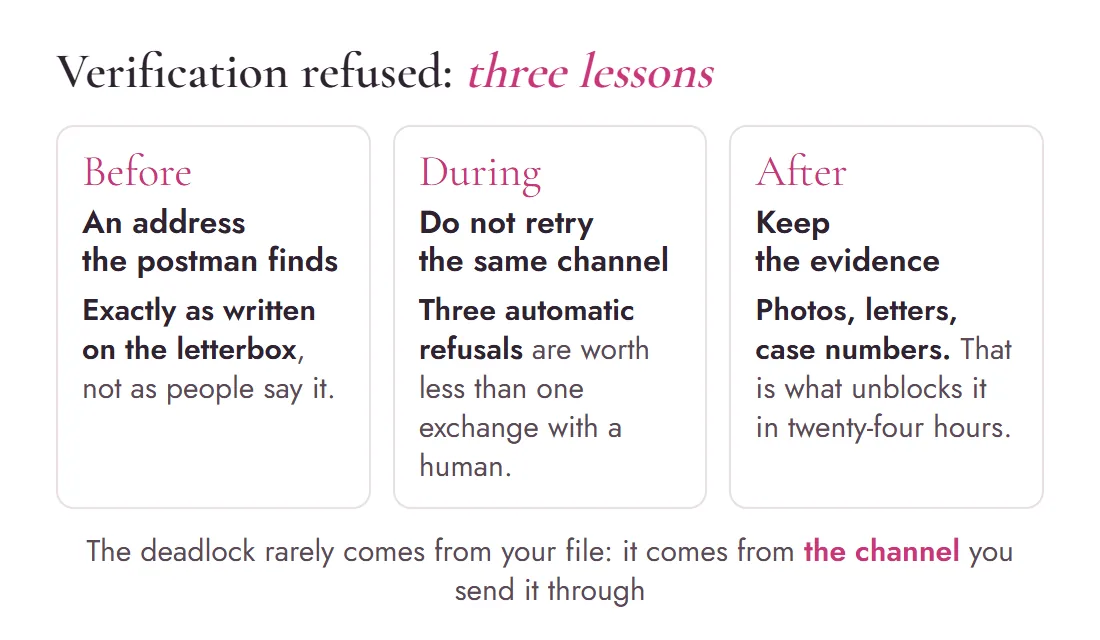
4 rules for a painless verification
- Be ready when the procedure starts. Codes, photos, videos: each Google request has a response window. Decide in advance who receives the codes, who films and who tracks the case; if an agency creates the profile for you, stay in direct contact with them during those days.
- Prepare the video like a property inspection. Google wants to see, in one continuous shot: the street and surroundings, the entrance, the sign, the interior, and proof of activity (equipment, stock, working tools). Film wide, slowly, in natural light. The video must be continuous, unedited, shot and sent from a phone; avoid showing faces or sensitive documents.
- The sign must be permanent. A printed sheet taped to the door gets rejected. A plate, a fixed panel, lettering: something the wind cannot take away. And if you do not receive customers at that address, do not build a sign just to pass the step: hide the address and declare a service area, and verification follows a different logic (tools, vehicle, proof of management).
- After two refusals, change method, not just the video. Read the displayed reason first and fix precisely what is missing. If the deadlock persists, one more identical attempt leads to the same result: go through support with a file (official documents, invoices, dated photos, refusal history) and request a re-examination of the case, or a video call with an agent if the option is offered.
The special case of the remote owner
Managing a profile while living far from the premises is exactly the configuration that derails verifications: letters arrive with nobody to read them, videos must be shot by someone on site, deadlines stretch. If that is your situation, and it often is for English-speaking owners with a business in France, appoint from the start one person on site responsible for the physical steps, and give them the ideal-video checklist above. Ten minutes of organisation that save three months of deadlock.
Once the profile is verified, maintenance can be done from anywhere: that is what we do for our clients, together with a profile optimised setting by setting and a watch on edits suggested by third parties. While you are at it, check that the profile actually belongs to you: who should be "primary owner", and how to verify it, is set out in Who owns your domain name and your accounts.
Frequently asked questions
Why does Google reject my verification video?
The most common reasons: the surroundings and entrance are not visible enough, the sign is missing or not permanent (a printed sheet is refused), or the video shows no proof of real activity. Film in one continuous shot: the street, the entrance, the fixed sign, the interior and your working equipment.
How long does Google profile verification take?
In the simple case, minutes to a few days: a code by phone, post or a short video. But every missed or refused step hardens the next one. A case that derails can stay blocked for months; hence the importance of being reachable from the moment you create the profile.
What should I do after several verification refusals?
Stop repeating the same attempt. Contact Google Business Profile support with a factual file: official company documents, invoices, dated photos, the precise history of refusals, and request a re-examination of the case. In our real case, a profile blocked for months was verified within 24 hours through that channel.
Can I verify a profile while living far from the premises?
Yes, but you need one person on site for the physical steps: receiving the letter, shooting the video, showing the sign. Appoint them before creating the profile and agree on a fast response time. Managing the profile can then be done entirely remotely.
Is a printed sheet enough as a sign for verification?
No: Google refuses a sheet of paper taped to the door. The sign must be permanent: a plate, a fixed panel, lettering. If you do not have one yet, a simple durable plate is enough, but it must exist before the video.
More questions? Many answers are already gathered on our FAQ page.
A blocked profile, a verification going nowhere?
We take over the case, prepare the evidence and go through the right channels, including when everything has already been refused. The first call is free.

Written byMaryna Skachek holds a PhD in biology, is a qualified e-commerce project manager and the founder of MariCleo Studio. She writes about digital strategy, content and the professional uses of AI.