
Does Google show your site in AI answers? Reading the Search Console report

When a customer asks Google for "an electrician near me" and Google displays an AI-generated answer directly in the results, is your site cited in it? Until this summer you mostly had to estimate it, often with third-party tools. Since 31 August 2026, Google says it has rolled out worldwide a report that answers the question, for free, inside Search Console. This article says where it is, what it measures, what it does not, and above all how to tie it to the only thing that matters for a small business: the enquiries that come in.
What changed, and since when
Google announced the report on 3 June 2026 on its Search Central blog, rolled it out gradually, and its help page now reads: "As of August 31, 2026, we've rolled out these insights to all websites worldwide." The report still carries a "Beta" label. The same page adds that some properties do not have access yet, and that the report may not show until the site has recorded impressions in these features. If you cannot see it, that does not necessarily mean there is a problem on your end.
What the report covers: AI Overviews, the generated summary that appears at the top of some results, and AI Mode, Google's conversational search experience. Discover has its own, separate report. Experiments running in Search Labs are not counted.
This arrives after an August in which Google had already changed three things in ten days, none of them visible on screen. The method for not reacting blind is in our guide What Google changed and how to measure it; the report discussed here is one more instrument in the same toolbox.
Where the report is
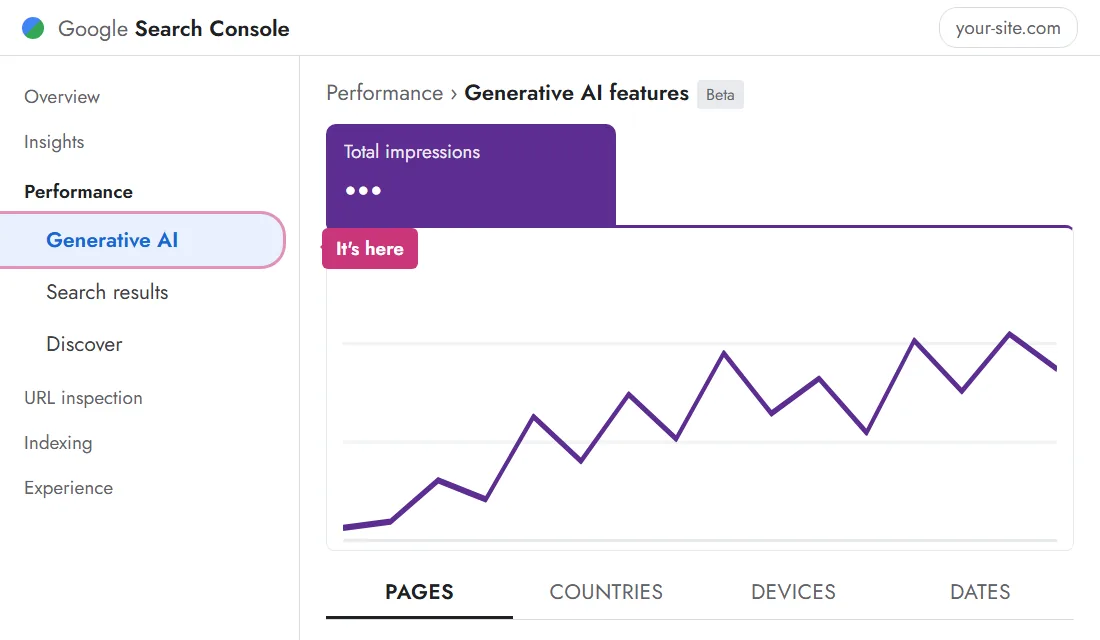
Open Search Console, then, in the left-hand column, expand Performance: the "Generative AI" entry is there. There is also a shortcut under the chart of the usual performance report, a banner with an "Open report" link. The screen follows the logic of the report you already know, but simpler: a single total card, a chart, and four tabs.
What an impression means here
An impression is counted each time a link to one of your pages was displayed inside a generative AI feature. Displayed, not read, not clicked. The report groups them by page (the canonical address), by country, by device and by date, with a choice of granularity from day to month. These impressions are also counted in the overall performance report: the new report adds no traffic, it isolates a share of what already existed without a label.
Two details matter when reading the data. Recent data is drawn as a dotted line while it is preliminary; it can move for a few hours. And the table stops at one thousand rows, a limit that is generally enough for the day-to-day analysis of a small or mid-sized business.
What it does not say, and that is the more useful half
No clicks. No click-through rate. No average position. No queries. The report answers "do I appear", it does not answer "what does that bring in". Google writes that it will add metrics over time; at the date of this article, it is impressions and nothing else.
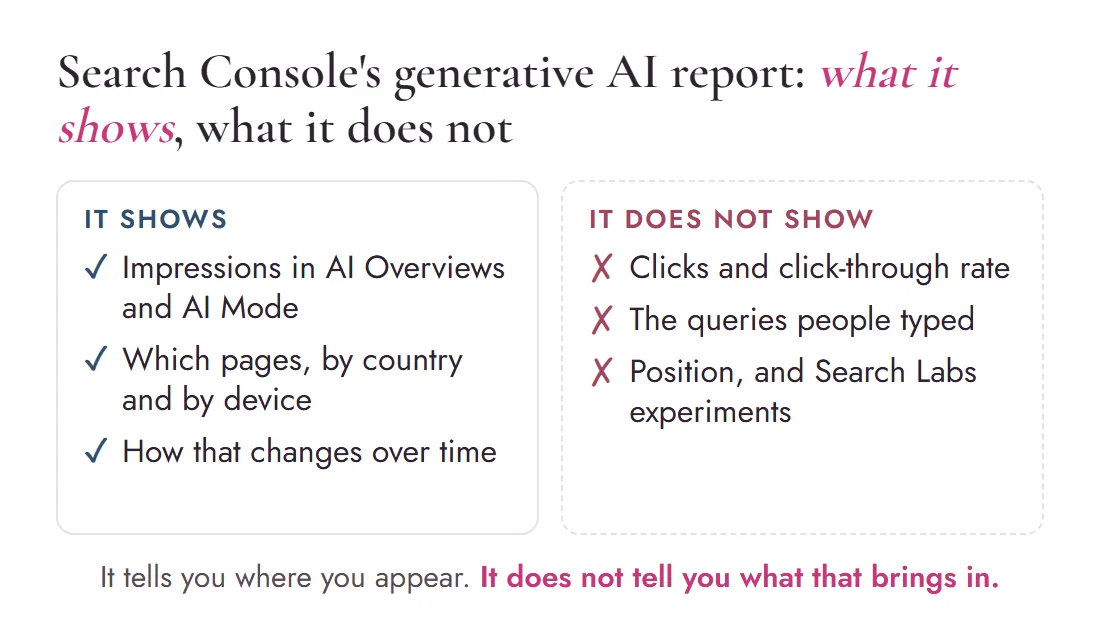
This limit is not a flaw to work around, it is a guard against a common mistake: taking a visibility counter for a commercial result. A page that appears a hundred times in generated answers has not "succeeded" for that reason alone. It has been displayed. What happens next has to be checked against your other data, and that is the question that counts.
Reading the report in four moves
Twenty minutes, no paid tools
- Open the "Generative AI" entry under Performance and set a date range. Use the same one every time, three months for instance, or you will be comparing different things.
- Sort by pages. The question is not "how many", it is "which ones". Look at what the top pages have in common: the topic, the structure, the precise question they answer.
- Cross-check against your enquiries. Open your analytics, your contact forms, your inbox, your CRM if you have one. Are the pages visible in AI also the ones bringing qualified visits, contact requests, quote requests? That is where the work starts.
- Export the data, date the file and keep a copy outside Search Console. The report is recent but already carries several weeks of history: an export dated today is your point of comparison in two months.
The third move is the one most often skipped, because no screen does it for you. It is also the one that turns a number into a decision. If your service pages appear in AI answers while your enquiries come mostly from an article, you have identified a gap between visibility and conversion. That gap is what you then need to understand. What the page must then do with a visitor who arrives with no context, we detailed in the landing page that convinces a stranger.
Common interpretation traps
A rising share is not a rising number. If your regular traffic drops, the relative share of AI impressions climbs on its own. Read the count, not the percentage.
A three-day swing proves nothing. The report is in beta, preliminary data moves, and the rollout of these features is not uniform across countries. Before concluding there is a drop, date it and separate brand from non-brand, as in our protocol after a Google traffic drop.
A page absent from the report is not an invisible page. It can rank well in regular results and never be picked up in a generated answer. The two reports are read together.
A correlation is not a cause. The report measures visibility. Your other tools measure what happens next. Neither one, on its own, establishes that one produced the other: two lines rising together are still just two lines.
The report does not replace tools that look elsewhere. For ChatGPT, Perplexity, Gemini or comparison with competitors, some third-party tools remain useful: they measure from the outside, from panels of queries. For Google, on the other hand, you now hold first-hand data, page by page.
What to do with a page that receives AI impressions
First, do not "re-optimise it for AI". Google's documentation on AI features states there are no additional requirements or special optimisations needed to appear there, and no new machine-readable files or markup to create. That puts certain commercial promises about a "special" optimisation for Google's AI into perspective.
Then check that the page does its job once the visitor lands: is the question it answers stated on the first screen? Is the way to contact you visible without scrolling? Is the information visible on the page, name, address, prices, opening hours, still accurate? And if you use structured data, does it match what is displayed, as Google asks? That last point is checked on the recorded values, not on the test's green light: we covered that August 2026 change in the structured data article.
Finally, record, date, and come back in four weeks. What you will know then, no tool sells you today: whether the pages visible in AI are also gaining ground in qualified visits and enquiries.
AI visibility is becoming measurable. Measurable does not mean profitable. In between sits your website, and what it does with the visitor.
Frequently asked questions
Where is the generative AI report in Search Console?
In the left-hand menu, under Performance, at the entry called "Generative AI". A shortcut also appears under the chart of the regular performance report, a banner with an "Open report" link. Google notes that some properties do not have access yet, or have not recorded enough impressions for the report to show.
Does the report give clicks from AI answers?
No. As of 9 September 2026 it shows impressions only, broken down by page, country, device and date. No clicks, no click-through rate, no position, no queries. Clicks from AI features remain counted in the overall performance report, without being isolated.
Is an impression in an AI Overview a visitor?
No. An impression means a link to your page was displayed inside a generated answer. It does not say whether anyone read it, let alone clicked or got in touch. It is a starting point for cross-reading with your analytics and your contact forms, not a result.
Should you optimise your site specifically for AI Overviews?
Google's own documentation says there are no additional requirements or special optimisations needed to appear in these features, and no new machine-readable files or markup to create. The underlying work remains ordinary search optimisation: pages that answer one precise question clearly.
More questions? Many answers are already gathered on our FAQ page.
Want to know which pages of your site already appear in Google's AI answers, and what those pages produce next on your site?
MariCleo Studio combines your Search Console data, your analytics and your contact journey to identify what deserves attention first. Not a "GEO optimisation", but a diagnostic review based on your own numbers.
Information current as of 9 September 2026; the report is in beta and Google announces additional metrics over time. Sources: Search Console Help, Generative AI performance report · Google Search Central, announcement of 3 June 2026 · Google, "AI features and your website". Cover photo: Karola G, Pexels.

Written byMaryna Skachek holds a PhD in biology, is a qualified e-commerce project manager and the founder of MariCleo Studio. She writes about digital strategy, content and the professional uses of AI.